


bink2w64.dll: Complete Guide to Errors, Fixes, Downloads, and Safe Troubleshooting
The file bink2w64.dll is one of the most frequently discussed game-related DLL files among PC gamers. When it goes missing or becomes corrupted, games may fail to launch, crash during startup, display error messages, or experience video playback issues. Because many modern games rely on middleware technologies to display cutscenes and cinematic content, understanding how this file works can save users significant troubleshooting time.
Whether you have encountered a “missing DLL” notification, startup failure, or unexpected game crash, this guide explains everything you need to know about bink2w64.dll, including its purpose, common problems, safe repair methods, and best practices for maintaining system stability.
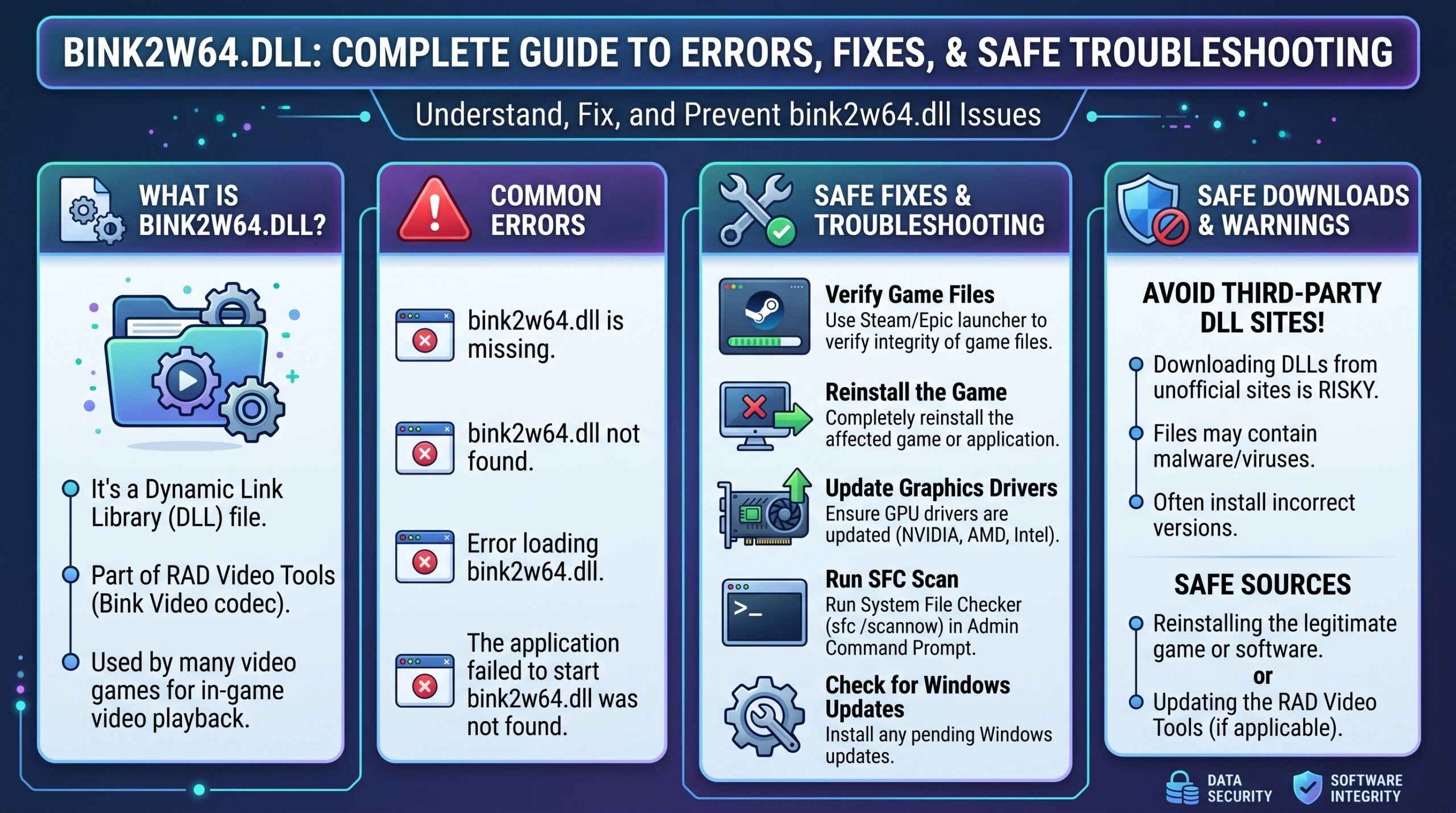
What Is bink2w64.dll?
The bink2w64.dll file is a dynamic link library associated with Bink Video technology, a widely used video codec solution integrated into many PC games. Its primary purpose is to handle video playback for cinematic sequences, intros, trailers, and in-game cutscenes.
Developed as part of a professional game development toolkit, this DLL allows game studios to deliver high-quality compressed video while maintaining performance across a wide range of hardware configurations. When the file functions correctly, players rarely notice its presence.
Why Games Use This DLL File
Game developers often rely on specialized video middleware instead of creating custom video systems from scratch. This approach improves compatibility, reduces development complexity, and ensures consistent playback behavior.
The presence of bink2w64.dll allows games to efficiently decode video content without placing excessive demands on CPU or storage resources. As a result, players can experience smoother transitions between gameplay and cinematic sequences.
Understanding DLL Files in Windows
A DLL, or Dynamic Link Library, contains reusable code that multiple programs can access. Rather than embedding identical functionality into every application, software developers place common features into shared libraries.
Windows loads these libraries when required. If a necessary DLL becomes unavailable, damaged, or incompatible, the operating system may be unable to execute specific functions, leading to startup failures and error messages.
How bink2w64.dll Works During Game Launch
When a game starts, it often performs a series of dependency checks. These checks confirm that required resources, libraries, and runtime components are available.
If bink2w64.dll is listed among those dependencies, Windows attempts to load the file into memory. Successful loading allows video-related functions to initialize correctly, while failures may stop the launch process entirely.
Common bink2w64.dll Error Messages
Users can encounter several variations of DLL-related errors depending on the affected game and Windows version. The wording may differ, but the underlying issue typically involves a missing, corrupted, or inaccessible file.
Common messages include “bink2w64.dll not found,” “The code execution cannot proceed because bink2w64.dll was not found,” and “Failed to load bink2w64.dll.” These messages generally indicate that the application cannot locate or use the required library.
Major Causes of DLL Errors
A missing file is not always the result of accidental deletion. Many factors can interfere with game dependencies and create launch problems.
Common causes include incomplete installations, interrupted updates, antivirus quarantines, storage corruption, malware infections, incompatible game modifications, and failed file transfers between drives.
Error Symptoms Beyond Startup Failures
Although startup errors are the most obvious indicator, DLL issues can appear in other ways. Some users report crashes when loading cutscenes or transitioning between game chapters.
Others experience black screens, frozen cinematics, missing intro videos, or unexpected returns to the desktop. These symptoms often point toward video playback components that depend on bink2w64.dll functioning correctly.
Games Commonly Associated With This File
Numerous modern titles use Bink Video technology to deliver compressed cinematic content. The specific game library varies across publishers and release years.
Popular action, role-playing, sports, racing, and open-world games may contain bink2w64.dll within their installation directories. The file is usually bundled directly with the game rather than installed globally across Windows.
The Difference Between Missing and Corrupted Files
A missing file means Windows cannot locate the required DLL at the expected location. This can occur after accidental deletion, antivirus removal, or incomplete installation.
A corrupted file exists physically but contains damaged or altered data. Corruption may result from storage failures, interrupted downloads, malware activity, or unexpected system shutdowns.
Safe Ways to Diagnose the Problem
Effective troubleshooting begins with identifying whether the issue originates from the game, Windows, or hardware. Users should first verify whether the error occurs with one title or multiple applications.
Checking installation folders, reviewing Windows Event Viewer logs, and examining recent system changes can provide valuable clues. These diagnostic steps often reveal the root cause without requiring advanced technical knowledge.
Why Downloading Random DLL Files Is Risky
Many websites offer standalone DLL downloads that promise instant fixes. While these sites may appear convenient, they often introduce additional risks.
A downloaded bink2w64.dll from an unverified source may be outdated, modified, incompatible, or malicious. Installing unknown system files can create security vulnerabilities and worsen existing issues.
Recommended Solution: Verify Game Files
The safest and most reliable repair method is usually file verification through the game launcher. Modern platforms compare installed files against official versions stored on their servers.
When discrepancies are detected, missing or corrupted files are automatically replaced. This process restores the correct version of the DLL without exposing the system to unnecessary security risks.
Reinstalling the Game When Verification Fails
Sometimes file verification cannot resolve severe installation problems. In such cases, a complete reinstallation may be necessary.
Removing the affected game and performing a clean installation ensures that every dependency, including bink2w64.dll, is restored exactly as intended by the developer.
Antivirus Software and False Positives
Security software occasionally identifies legitimate game files as suspicious. While uncommon, false positives can lead to quarantined DLLs and broken game installations.
Users experiencing sudden errors after antivirus scans should review quarantine logs. If a legitimate file was removed mistakenly, restoring it through official repair methods is generally the safest approach.
Relationship Between Malware and DLL Issues
Malware can damage application files, modify system settings, and interfere with software dependencies. In some cases, malicious programs disguise themselves using names similar to legitimate DLLs.
Running reputable security scans helps eliminate potential threats and ensures that any instance of bink2w64.dll on the system remains authentic and unmodified.
Compatibility Considerations Across Windows Versions
Most modern games supporting Bink Video are designed for current Windows environments. However, compatibility issues can still arise after major operating system updates.
Keeping Windows updated while maintaining current graphics drivers helps reduce conflicts that may affect DLL loading behavior and multimedia playback functionality.
Comparison of Common Causes and Solutions
| Problem Type | Typical Symptoms | Likely Cause | Recommended Fix |
|---|---|---|---|
| Missing DLL | Game won’t start | File deleted | Verify game files |
| Corrupted DLL | Startup crash | Damaged installation | Reinstall game |
| Antivirus Removal | Sudden error after scan | False positive | Restore and verify files |
| Storage Errors | Random crashes | Disk corruption | Run disk diagnostics |
| Malware Activity | Multiple system issues | Infection | Security scan and cleanup |
| Update Conflict | Error after patch | Version mismatch | Reinstall or repair game |
This comparison highlights that different symptoms may require different solutions. Correct diagnosis prevents unnecessary troubleshooting and saves considerable time.
How Storage Devices Affect DLL Integrity
Hard drives and SSDs play a critical role in maintaining application files. Physical degradation, bad sectors, or controller issues can corrupt stored data.
When errors repeatedly affect the same game files, checking storage health becomes an important step. Reliable hardware helps preserve DLL integrity and overall application stability.
The Role of Game Launchers
Modern launchers perform more than simple download management. They also validate installations, distribute updates, and repair damaged files automatically.
These platforms provide one of the safest methods for restoring bink2w64.dll because replacements originate directly from official game repositories rather than third-party sources.
Driver Updates and Multimedia Dependencies
Graphics drivers influence how games process and display multimedia content. Although driver issues do not directly remove DLL files, they can contribute to crashes and playback failures.
Maintaining updated drivers ensures smoother interaction between the operating system, graphics hardware, and video playback libraries used by modern games.
Common Misconceptions About DLL Errors
One widespread misconception is that every DLL error requires downloading a replacement file. In reality, the underlying problem often involves installation integrity rather than file absence.
Another misconception is that all DLL files belong in system folders. Many game-specific libraries, including bink2w64.dll, are intentionally stored inside individual game directories.
Practical Troubleshooting Workflow
A structured troubleshooting approach improves success rates and minimizes unnecessary changes. Begin with file verification, then review antivirus activity and recent updates.
If problems persist, perform a clean reinstall, update drivers, scan for malware, and examine storage health. This sequence addresses the most common causes in a logical order.
Industry Importance of Video Middleware
Video middleware has become an essential component of modern game development. Studios increasingly depend on proven technologies to reduce production complexity and improve performance consistency.
As games continue to incorporate cinematic storytelling, libraries such as bink2w64.dll remain important behind-the-scenes components that enable immersive visual experiences.
Expert Perspective on File Integrity
As many system administrators emphasize:
“The safest fix is almost always restoring files from the original source rather than downloading replacements from unknown locations.”
This principle applies especially to gaming dependencies, where authenticity and version compatibility are critical for stable operation.
Future Trends in Game File Management
Game distribution platforms are becoming more sophisticated in detecting corrupted content and automatically repairing installations. Cloud-based validation systems continue to improve reliability.
Future technologies may further reduce the frequency of DLL-related errors, though dependency management will remain a fundamental aspect of software deployment and maintenance.
Conclusion
The bink2w64.dll file plays an important role in video playback for many modern games. While users often encounter it only when something goes wrong, understanding its purpose can make troubleshooting far more effective.
Most issues involving bink2w64.dll stem from missing files, corruption, antivirus interference, installation problems, or storage-related errors. The safest solutions typically involve verifying game files, repairing installations, updating software, and avoiding untrusted DLL download sites. By following these best practices, users can resolve most errors quickly while maintaining system security and long-term stability.
Read More: 192.168.l.254: Complete Router Login, Setup, Troubleshooting, and Security Guide
FAQ
What is bink2w64.dll?
bink2w64.dll is a game-related dynamic link library used for video playback, cinematic sequences, and multimedia content in many PC games.
Is bink2w64.dll a virus?
No, the legitimate bink2w64.dll file is not a virus. However, malware may occasionally use similar file names to disguise malicious software.
How do I fix a missing bink2w64.dll error?
The safest solution is to verify game files through the official launcher or reinstall the affected game if verification does not resolve the issue.
Can I download bink2w64.dll separately?
While standalone downloads exist online, they are generally not recommended. Restoring bink2w64.dll from official game sources is safer and more reliable.
Why does my game crash because of bink2w64.dll?
Crashes may occur when bink2w64.dll is missing, corrupted, quarantined by antivirus software, or incompatible with the installed game version.
Does reinstalling Windows fix bink2w64.dll problems?
Reinstalling Windows is rarely necessary. Most bink2w64.dll issues can be resolved through game repair tools, reinstalls, driver updates, or malware scans.
Can storage problems damage bink2w64.dll?
Yes. Hard drive failures, SSD issues, and file system corruption can damage bink2w64.dll and other game-related files, leading to launch and playback errors.